2019年4月10日星期三

7 Best Free Android Apps to Extract Audio from Video 2019


Today, we bring you a list of Android apps that can separate or extract audio from the video. Why would you want to do that? To create memes with funny sounds or adding a piece of background music from another video to your creation or maybe you’ve taken a slight liking for the music. These apps are capable of editing frame by frame audio which gives it a professional feel. So scroll down and extract your favorite tune.
Best Free Android Apps to Extract Audio from Video:


Video to MP3 Converter


Video to MP3 Converter By InShot


Timbre


MP3 Video Converter


Easy Video Cutter


Audio Video Mixer Video Cutter video to mp3 app


Video To Audio Converter media converter ringtone
1. Video to MP3 Converter

Video to MP3 Converter is the most versatile and user-friendly app for beginners and advanced users alike. Being a completely free app, you get more than you ask for. The UI is simple to navigate through myriads of features which includes basic audio conversion, faster video conversions, video cutter, and mp3 cutter, making ringtones and so on. This app supports a bitrate of up to 320kbps, so audiophiles shouldn’t have to worry about audio performance. Various formats for video conversion are supported. Video to MP3 Converter uses libmp3lame and FFmpeg and as a library. So, download the link below and start converting the audio.

Main Features:


Simple and Advanced mode.


Faster speeds for cutting videos.


Up to 320kbps bitrate supported.


1-tap music play.

Download Video to MPE Converter
2. Video to MP3 Converter by InShot

InShot has scored a goal with Video to MP3 Converter, giving us a basic app which could give other apps a run for their money. It has the usual converting features, accompanied by video merging and trimming, creating ringtones, merging audio, etc. This app is the only converter which converts up to 15 videos at a time, including a sound boost and support for up to 320kbps bitrate. The app is a bit confusing to navigate but it’s only because the number of features it houses. So, click on the link below and give this app a shot.

Main Features:


Batch video conversion, of up to 15 videos.


Basic audio effects.


Supports background conversion.


All in one media converter.

Download Video to MP3 Converter by InShot
3. Timbre

Timbre is a comprehensive audio-video editor that is your one-stop app to get things done. Though basically for audio editing purposes, you can also edit videos in this app. You get to do a video to audio conversion, audio splitting, omitting, change the bitrate of the audio, speed up an e-book, amongst other things. Coming to the video department, you also get splitting and omission features, along with changing the speed of the video and a video to GIF converter. The exported media files are innately compressed which doesn’t sacrifice overall the quality. So, head on to the Play Store and download this amazing converter.
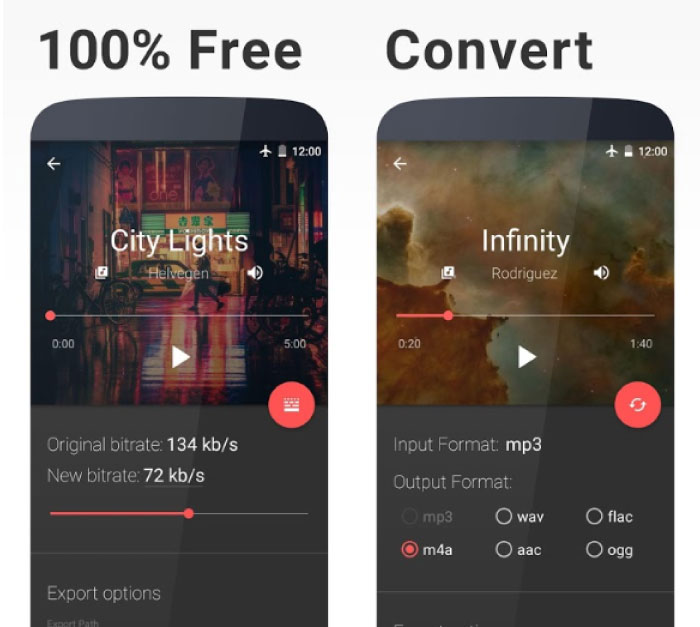
Main Features:


Audio+video merger.


Convert audio and video.


Convert video to GIF.


A/V Splitting and omitting.

Download Timbre
4. MP3 Video Converter

MP3 Video Converter by Pix Team is a simple example of being an all-rounder. The app UI feels smooth; it’s material design is basically the best on any app featured on this list. This app is a classic example of beauty with brains, and while you can’t get over how good it looks, you will be overwhelmed with the sheer amount of features. MP3 Video Converter supports faster conversion which is a must if you in a hurry for that last DJ dance. You also get various audio and video formats to convert to. The bitrate is limited to 256kbps but I’m sure the audiophiles won’t make a fuss. Another handy feature is the one tap play for the recently converted music. So, download this app by clicking the download link below.

Main Features:


Attractive Material Design.


Faster conversions.


48kbps to 256kbps bitrate support.


Various audio and video formats supported.

Download MP3 Video Converter
5. Easy Video Cutter

Naing Group brings up Easy Video Cutter, which is the only app you will need to edit audios and videos. The audio extraction process is quite simple as is the UI. This app is so versatile that along with editing audio, you get features that are capable of editing videos. Cut videos, merge them, mute a part of the video, apply slow motion or time-lapse, compress the size of the video amongst others. You can also create GIFs and convert your favorite part of a video into GIF. So, download this all-in-one app to save extra storage and be creative.
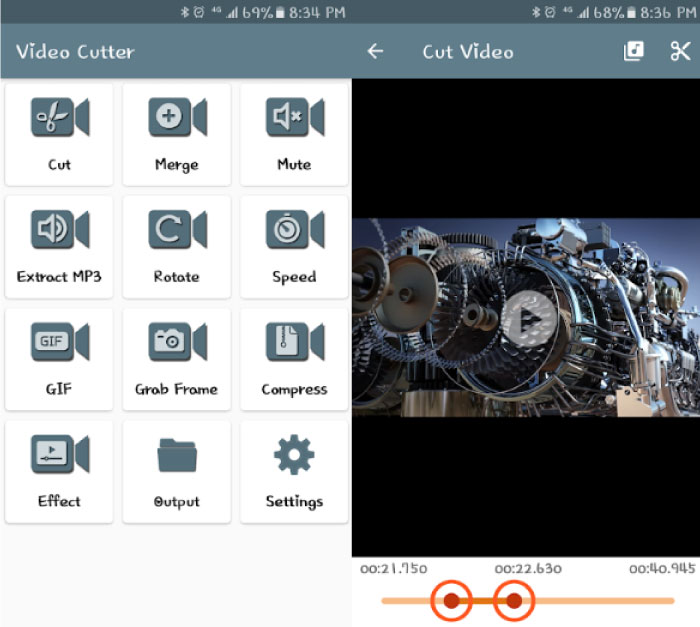

Main Features:


Extract audio.


Merge videos.


Video filters and effects.


Create GIFs.

Download Easy Video Cutter
6. Audio Video Mixer Video Cutter video to mp3 app

Another free app on this list, Another Video Mixer fulfills all your needs of extracting audio with some extra features, which include audio video mixer, audio, and video cutter, converting video to mp3, adding audio to video, mixing audio and video, and so on. The app UI is simple for navigation and daily usage. Apart from all the above features, you can also cut music to create ringtones. So, download this app for your musical needs.


Main Features:


Mute the audio in video


Ringtone cutter.


Add various audio files in one video.


Video Trimmer.

Download Audio Video Mixer Video Cutter video to mp3 app
7. Video to Audio Converter media converter ringtone

Asquare Mobile Apps gives you a no-nonsense app that simplifies extracting audio from your favorite video. This app supports various formats like mp3, wav, aac, etc. which is easy for sharing on various social media. Apart from converting audios, Media Converter also lets you edit videos. The app is totally free. So, grab this app and extract audios.


Main Features:


Extract audio files from videos.


Divide audio files.


Different bitrates.

Download Video To Audio Converter media converter ringtone

We shortlisted these apps keeping in mind the versatility and user friendly-ness. Which app did you find suitable for your needs? Do let us know in the comments section below.Sponsor ads:

Gihosoft Free iPhone Data Recovery:https://www.gihosoft.com/iphone-data-recovery-free.html

Gihosoft iPhone Data Recovery Free

Free iPhone Data Recovery Software for Windows/Mac

Recover up to 12+ types of files, including contacts, SMS, photos, WhatsApp, Viber, notes, etc.

Restore lost data from iOS devices directly or from iTunes and iCloud backup

Recover iPhone data lost due to iOS upgrade/jailbreak, accidental deletion, device lost or broken

Support all the latest iPhone, iPad and iPod Touch

Both Free and Pro version.

If you lost data after you updated to a new iPhone, you can always use Gihosoft iPhone Data Recovery to get the data back from the old iPhone or backup. You may also like:iphonerecovery.com

If you use android phones, please choose Gihosoft Android Data Recovery.With Gihosoft Android Data Recovery, no longer afraid of data loss!

Must read:Youtube video downloader for pc

Gihosoft RePicvid Free Photo Recovery Software provides a free photo recovery software for windows to help users recover the deleted or lost photo for free.


2019年4月8日星期一

SSL certificates

To put it simply, SSL certificates are helpful to encrypt sensitive information that’s transferred between the browser and the hosting servers which means, you can easily encrypt sensitive information on your website such as debit card, credit card information and so on.

So there you go, there are a ton of benefits of using SSL certificates to get https version.

All in all, here are 3 simple steps involved in getting https version of your site.
  1. Buy a SSL Certificate (if you’re using Bluehost hosting, SSL certificate is completely free)
  2. Activate the certificate
  3. Install and turn on the certificate
All the above steps mentioned in the post which you can read from here.
Let me know if you’ve any questions.

To Your Blogging Success,
Anil Agarwal

SEO Expert and Founder at BloggersPassion.com

一个简单的提升SEO排名的“第三人”策略2019


一个简单的提升SEO排名的“第三人”策略。


了解TASS的伙伴们一定知道,网站的内容一定是基于两种不同类型的文章:1、Commercial articles 2、Info articles。Ahrefs的Joshua Hardwick这次所讲的“第三人”策略其实也是基于这两种文章,不过他更加清楚的阐述了如何通过内链将Info articles的权重传递至Commercial aricles。不仅如此,Joshua也进一步传授了关于如何创作Info articles的方法,感兴趣的伙伴可以点开原文进行学习!

原文:https://ahrefs.com/blog/seo-strategy/

2019年4月1日星期一

How to Unlock a Disabled iPad


How to Unlock a Disabled iPad Using iTunes

You can back up your device if you haven’t already done so because the following operation will wipe your iPad. Note that. You can only perform this operation using a PC which you have synced your iPad with previously.


Attach your iPad to a PC you have synced with previously.


Open iTunes. If you have synced on this computer before, it shouldn’t ask you for a password.


Wait for iTunes to sync your device and make a backup.


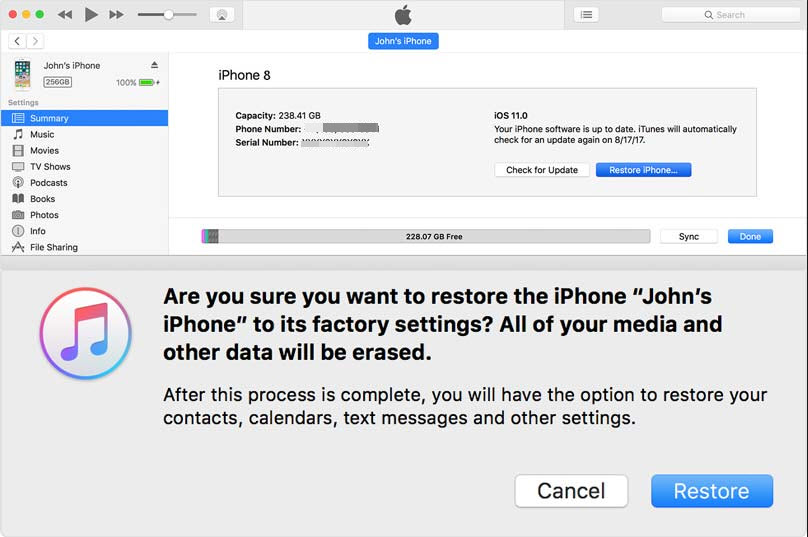
After the syncing, click “Restore iPhone” when the restoration finishes. This will reinstall firmware from scratch.


The iOS setup screen pops up after the reinstallation of the firmware - Tap “Restore from iTunes backup”.


Select the backup you wish to restore.


What to do if you forgot your iPad password? Turn to this solution. It will restore your iPad to an earlier state; the one as at the time the backup was taken. The password of the device is also reset during the process. Hence, you can go ahead to change the password to a new one.

If you have never synced your iPad with any available computer, don’t fret. You can still reset your password using recovery mode.
How to Reset iPad Using Recovery Mode If You Forgot Password

This final option works for every iPad and every PC, whether or not the iPad has been synced with the PC before. This method of resetting your iPad is by making use of the Recovery mode. Remember that this process will erase all the data from your iPad. The steps you should follow to unlock your iPad with Recovery mode are as follows:

Step 1: Put your iPad in recovery mode. On your iPad, press and hold the Home and Top (or Side) buttons at the same time. Do not remove your fingers from these buttons until the Recovery mode screen comes on.

Step 2: iTunes will prompt you to restore or update your iPhone. Select Restore.


Step 3: The update should then be downloaded. If it takes longer than 15 minutes, the iPad automatically exits the recovery mode, then repeat the above steps to return to recovery mode.

You can set a new password for your iPad once the process completes.
Conclusion

You can be in massive trouble and don’t know what to do if you forgot password on iPad Air or other Apple device. The only way is to restore it. You can reset your iPad password by using the fantastic third-party app - iMyFone LockWiper, using iCloud, iTunes, and so forth. Most of these methods will wipe your iPad data, so we advise that you take regular backups of database instances.Also Read:jihosoft Free iPhone Data Recovery

Sponsor ads:

Gihosoft Free iPhone Data Recovery:https://www.gihosoft.com/iphone-data-recovery-free.html

Gihosoft iPhone Data Recovery Free

Free iPhone Data Recovery Software for Windows/Mac

Recover up to 12+ types of files, including contacts, SMS, photos, WhatsApp, Viber, notes, etc.

Restore lost data from iOS devices directly or from iTunes and iCloud backup

Recover iPhone data lost due to iOS upgrade/jailbreak, accidental deletion, device lost or broken

Support all the latest iPhone, iPad and iPod Touch

Both Free and Pro version.

If you lost data after you updated to a new iPhone, you can always use Gihosoft iPhone Data Recovery to get the data back from the old iPhone or backup.You may also like: iphonerecovery.com

Also Read:Update Android

Also Read:Top 8 Best Alternative Websites to TamilGun in 2019

Also Read:Free Download FRP Bypass APK for Android 2019

Also Read:Best 10 Movie4k Alternative Websites for Movie Streaming 2019

Also Read:Top 32 Best Proxy and Mirror Sites to Unblock Fmovies 2019

Also Read:Best Torrent Search Engine Sites to Find Your Favorite Torrents 2019


谷歌搜索引擎如何对网址进行排名?


排名

谷歌搜索引擎如何对网址进行排名?
为了确定相关性,搜索引擎综合使用算法或公式多维度的检索和排序存储的信息。多年来,这些算法经历了许多变化,以提高搜索结果的质量。例如,Google 每天都会进行算法调整- 其中一些更新是次要的质量调整,而另一些则是用于解决特定问题的核心/广泛算法更新,例如谷歌企鹅算法解决垃圾邮件的问题。
为什么算法经常变化?虽然谷歌并不透露具体算法细节,但谷歌在进行算法调整时的最终目标是提高整体搜索质量。因此如果的你网站在算法调整后受到影响,请将其与Google的网站质量指南或搜索质量评估指南对比,进行网站的改进。

搜索引擎想要什么网站?

在搜索引擎眼中只有一种网站是最好的:以最有用的方式为搜索者的问题提供有用的答案。如果这是真的,那么为什么现在看来SEO与过去几年不同?
从某人学习新语言的角度考虑一下。
起初,他们对语言的理解非常简单,随着时间的推移,他们的理解开始加深,开始学习语义(语言背后的意义以及单词和短语之间的关系)。最后,通过足够的练习,他们能够很好地理解语言,甚至能够理解细微差别,并且能够为模糊或不完整的问题提供答案。
回到搜索引擎,当搜索引擎刚刚开始学习我们的语言时,某些作弊手法可能会容易骗过搜索引擎。以关键字填充为例。如果你想为某个特定的关键词排名,比如“帽子批发”,你可以在页面上多次添加“帽子批发”这些词,然后加粗,一般这样会有不错的排名。这种策略造成了糟糕的用户体验,它可能在过去有效,但现在搜索引擎已经能够识别出这是作弊。
链接在SEO中的作用
网站链接一般分为两种:网站内部链接和反向链接。反向链接或“入站链接”是指别的网站指向我们的网站,而内部链接是指自己网站上指向其他网页(在同一网站上)的链接。
链接在SEO中发挥了重要作用。原来搜索引擎主要依靠外链来确定网站的排名,但是现在排名的因素变得多样化。
反向链接与现实生活中的投票推荐非常相似。我们以一家bread面包店为例:
  • 来自他人的推荐=良好的权威标志
    示例:许多不同的人都告诉过你,bread是镇上最好的面包店
  • 来自你自己的推荐=有偏见,不具有权威
    示例:珍妮声称珍妮的面包是镇上最好的
  • 来自不相关或低质量来源的推荐=不是一个好的权威标志,甚至可能会被标记为垃圾外链
    示例:从来没有购买过面包店的人说面包很好。
  • 没有推荐=不明确的权威
    例如:面包店可能会很好,但你一直找不到任何有意见的人,所以你无法确定。
这就是创建PageRank的原因。PageRank(谷歌核心算法的一部分)是以谷歌创始人之一拉里佩奇命名的链接分析算法。PageRank通过测量指向它的链接的质量和数量来估计网页的重要性。假设网页越相关,重要且值得信赖,它将获得的链接越多。从高权威(可信)网站获得的自然反向链接越多,网站在搜索结果中排名越高的几率就越大。

网站内容很重要

内容不仅仅是文字; 它是任何被搜索的东西,比如视频,图像,当然还有文字。如果搜索引擎是应答机器,则内容是引擎提供这些答案的手段。
每当有人进行搜索时,都会有数千种可能的结果,那么搜索引擎如何确定向搜索者提供有价值的页面呢?其中一个重要因素是页面上的内容与查询意图的匹配程度。换句话说,这个页面是否匹配搜索到的单词并完成搜索者试图完成的任务。
没有严格的基准规定内容应该有多长,应该包含关键字的次数,或者在标题标记中添加的内容,我们要把重点应放在将要阅读内容的用户身上。
谷歌发展至今,有数百甚至数千个排名因素,但有三个一直没有改变:链接到网站(作为第三方可信度信号),页面内容(满足搜索者意图的高质量内容),以及RankBrain。

什么是RankBrain?

RankBrain是Google核心算法的机器学习组件。机器学习是一种计算机程序,通过新的观察和分析数据不断改进其预测。换句话说,它总是在学习,并且因为它总是在学习,所以搜索结果不断改进。
例如,如果RankBrain注意到排名较低的URL比排名较高的URL向用户提供的结果更好,RankBrain将调整搜索结果,将更相关的结果排名得更高并将较低相关页面排名降低。
由于谷歌将继续利用RankBrain推广最相关,最有用的内容,因此我们需要专注于满足搜索者的意图。为可能登陆网页的搜索者提供最佳信息和体验。

谷歌工作人员透漏

虽然他们从未使用过“直接排名信号”这一术语,但Google已明确表示他们绝对会使用点击数据来修改特定查询的SERP。
根据Google前搜索质量主管 Udi Manber的说法:
“排名本身受点击数据的影响。如果我们发现,对于特定查询,80%的人点击#2,只有10%点击#1,过了一段时间我们发现可能#2是人们想要的,所以我们将切换它。“
前谷歌工程师Edmond Lau的另一个评论证实了这一点:
“很明显,任何合理的搜索引擎都会在自己的搜索引擎上使用点击数据反馈到排名中,以提高搜索结果的质量。使用点击数据的实际机制通常是专有的,但谷歌明显表示它使用点击数据及其专利等系统,如排名调整的内容项目。“
由于Google需要维护和提高搜索质量,因此点击率指标是存在的。
各种测试证实,谷歌将根据搜索者的参与度(点击率等)调整页面排名:
  • 兰德·菲什金(Rand Fishkin)2014年的测试结果显示,在让大约200人点击SERP的URL之后,排名第七的结果一直升至第一位。有趣的是,排名改善似乎与访问链接人的位置有关系。排名位置飙升在美国谷歌,这正是参与者所在的位置,而在谷歌加拿大,谷歌澳大利亚等页面上的排名仍然较低。
  • Larry Kim对 RankBrain之前和之后的首页及其平均停留时间的比较似乎表明,Google算法的机器学习组件降低了人们不会花费太多时间页面的排名位置。
  • Darren Shaw的测试也显示了用户行为对本地搜索和地图包结果的影响。
由于用户参与指标明确用于调整SERP的质量,SEO应该多关注页面质量和用户。
以上就是谷歌抓取,索引和排名的机制,针对谷歌算法提供了一些SEO指导,希望对大家有帮助。

Wpscan使用教程-Wordpress网站漏洞扫描


Wpscan是专门检查Wordpress网站漏洞的工具,它可以全面检查wp网站的漏洞,有助于我们增加网站安全防护。但是也有人使用Wpscan渗透别人的网站,最近我客户的网站就被黑了,现在简单把使用wpsan检查网站漏洞的教程分享给大家,同时会有教程检查自己网站的密码强度。
Wpscan不支持Windows系统,只支持Linux和Mac系统,因此如果我们是Windows系统,可以安装虚拟机来实现。

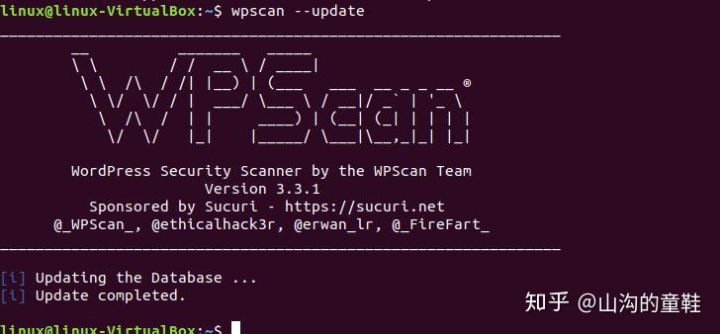
一 更新wpscan到最新版本:

命令:wpscan –update
更新完成后,我们看到最新的版本是3.3.1。

二 输入我们要检查的WP网站

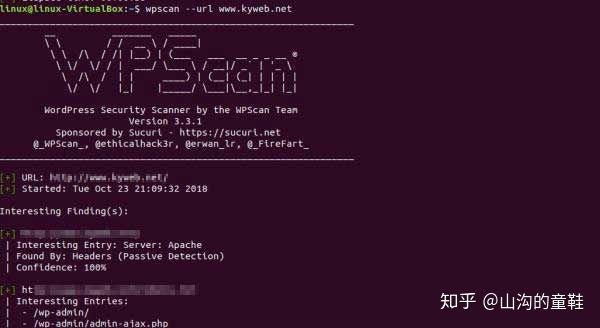
我以某个网站为例 ,首先扫描这个网站可能出现的漏洞
命令:wpscan -url (网站)
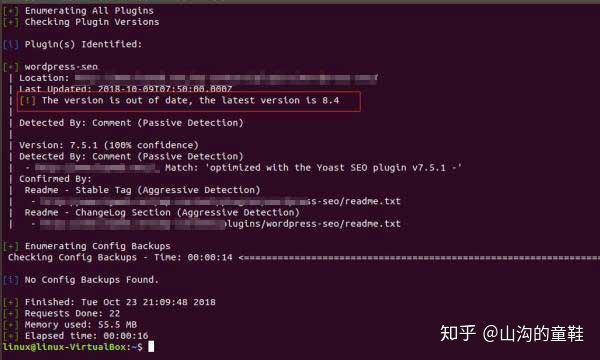
通过扫描我们发现网站有一个插件过期了,这就需要我们及时更新,出现感叹号提示就是需要我们注意的,如果出现红色,就说明网站有漏洞,现在来看这个网站是没有插件漏洞的。
同时我们可以使用其他命令,检查我们网站的其他信息,wpscan安装和命令教程请访问:https冒号//wpscan。org

三 对网站用户进行枚举

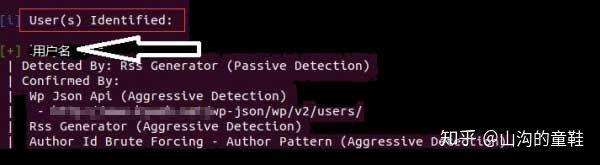
命令:wpscan –url (网站链接) –enumerate u
接下来我们找到 User identified 就可以看到网站的登录用户名:

四 对网站密码进行暴力破解

首先我们需要密码字典,在这里我们用curnch创建密码字典(需要安装curnch),curnch是一款专门的密码字典生成软件,我们简单测试,使用curnch创建2位数密码,并且保存到wd.txt文件。
更新crunch,命令:crunch –update
使用curnch创建2位数密码,并且保存到wd.txt文件
命令:crunch 2 2 >>wd.txt
生成密码文件字典后,我们开始用wpscan暴力破解密码。
命令:wpscan –url (网站链接) –wordlist wd.txt –username 用户名
如果找到了相匹配的用户名与密码,工具将直接以admin:password的形式显示出来。
破解的关键是密码字典要足够强大。
针对暴力破解最安全的方法就是限制用户登录尝试次数,这样我们的网站才能更加安全。
有问题欢迎给我们留言。

Semrush终极教程-外贸网站on-page SEO 2019年3月


必须得承认,现在Semrush比以前强大太多了!半年前,我还会觉得semrush其实可有可无,因为很多功能只适合大中型企业,对于大多数做外贸的同学可能不实用,再加上核心功能(外链分析等)比起ahrefs略差,所以semrush基本是被抛弃的。

但是现在我个人感觉semrush完全可以取代ahrefs了。

原因有三个,第一:semrush多了几个非常实用,甚至可以说是做SEO必备的功能(今天教程我们会讲两个);第二:semrush核心竞争力——查看竞争对手的关键词及流量情况远胜ahrefs;第三:跟majestic合体之后,外链分析能够和ahrefs一争长短。

好了,现在进入正题:Semrush seo content complete 和 seo audit功能讲解。

SEO Content Template

什么是Seo content template?

简单说就是,你想把某个关键词做到谷歌首页,于是围绕这个词写了很多文字内容,但你没法确定这些文字内容行不行,这个时候你就可以用semrush这个功能了,它可以告诉你如何改进你的内容。

其实它的原理很简单,就是分析一下对应关键词排在谷歌前十的网页,看这些网页里出现频率较高的关键词,看这些网页的文字数量,然后指导你把高频关键词都写进去,把文字数量提升到平均标准以上。(很简单但是非常有用,还有聊到semrush的时候,好多朋友最先提起的就是这个功能,而且根据他们的实践,按照这个功能的提示修改内容后,对排名很有好处。)

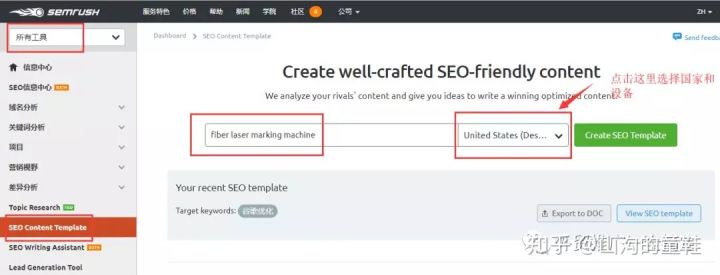
使用也非常简单:

直接输入关键词,选择国家和设备,然后点击绿色按钮进行搜索即可(下图输入的是fiber lasering marking machine举个例子)


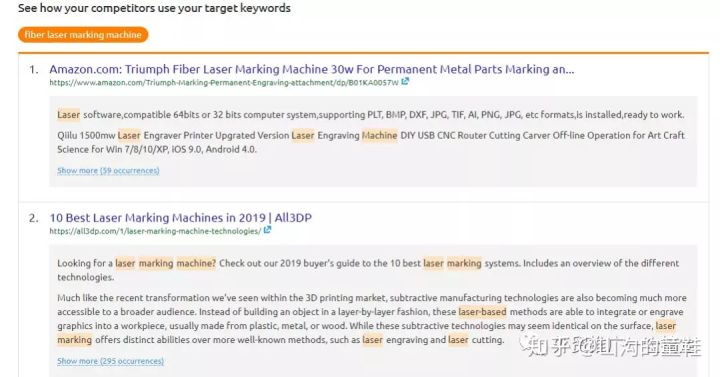
然后我们可以看到它的分析结果和提示:


有了这些数据,我们完全可以将这些关键词重新布局到我们的文字内容以及页面TDK中,同时让文字数量和可读性至少达到平均标准。

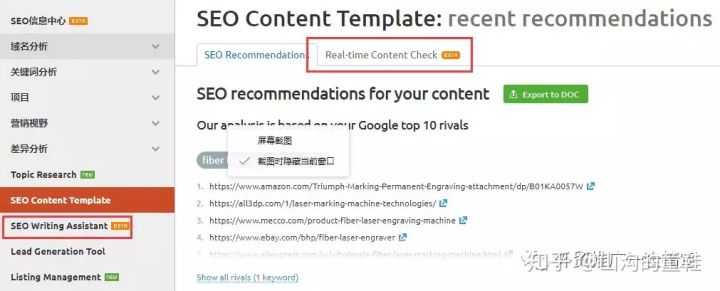
当然,semrush非常贴心,除了给出提示,现在还多了一个功能,那就是可以让我们按照提示直接在semrush里面进行内容创建,或者把我们创建的内容放到semrush里直接检测,只需要点一下下面两个选项就行了:


比如,我们点击real-time content check,把我们写完的内容输入进去,然后查看右侧评分,如下图:


可以发现我们这篇内容总分完全没问题,但是字数差了一些,另外就是排名前十网页出现的高频词,我们漏掉不少,所以改进方案就是,字数加长,然后高频词布进去。

SEO Audit

SEO audit从字面意思我们就能看出来,这是检测网站的seo状况的,主要是针对technical seo和on page seo来做检测,优点是:对中小网站来说,可以一次性检测全部网页,并且将网站站内seo问题清晰的显示出来。缺点是:对某些问题并没有提供详细的解决方案,依然需要我们自己去找解决方法。(当然,所有检测工具都是这样,一全老师从来没见到能提供所有完美解决方案的检测工具)

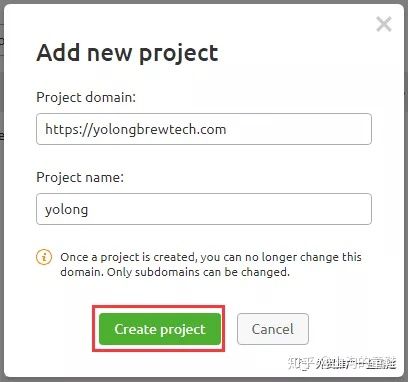
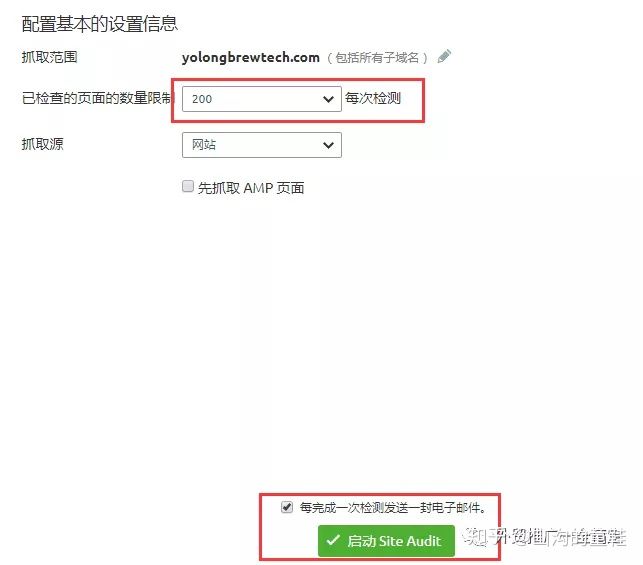
使用方法也非常简单:右上角选择seo工具箱,然后找到靠近底部的site audit选项,点击新的site audit按钮,然后输入网址和名称,添加一个新的项目:


然后选择抓取网页数量和从哪里抓取,点击按钮开始就可以了,如下图:


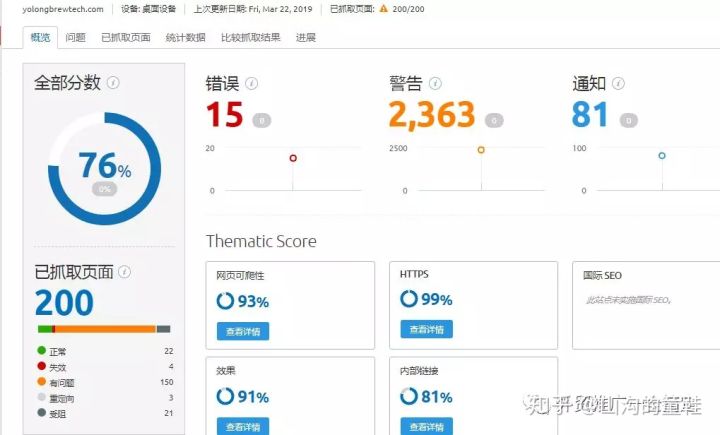
然后我们看下检测数据:


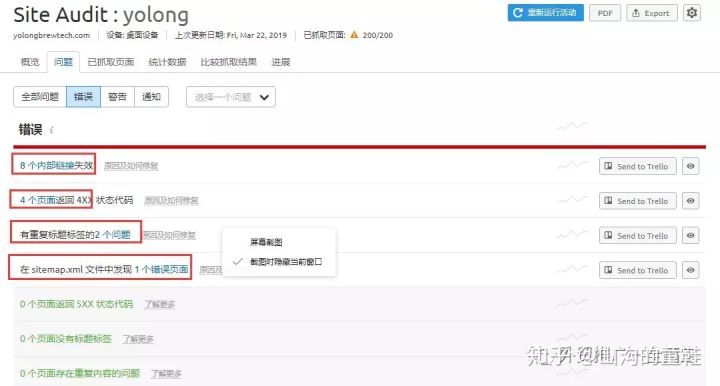
看起来问题还是不少的,我们可以点击错误、警告、通知,然后查看详细的报告,比如:


在错误信息页面,我们发现我们网站内链有问题、有404页面、还有重复标题的页面等等,点击蓝色文字我们可以详细看到有错的页面是哪些以及具体的错误。

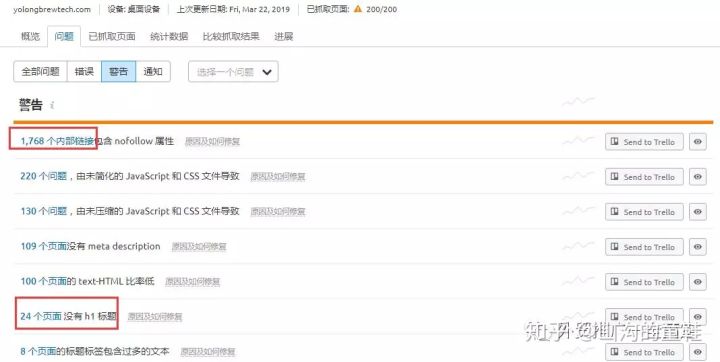
同样的,对于警告信息也是如此:


这样我们就可以按照site audit提供的信息对站内seo进行优化,非常简单而且有效。

这样semrush的站内seo优化相关的两大功能就讲完了,当然,semrush对优化站内有用的功能并不只有这两个,只是用处和效果没有这两个大。还是semrush固有的一个缺点,功能太多甚至繁杂,但是很多功能还需要提升实用性。

如果您有任何外贸SEO推广问题,欢迎给我们留言。

Also Read: